How to Fix Online Reputation: A Step-by-Step Guide
Learn how to fix online reputation with a review audit, public replies, compliant feedback requests and weekly tracking for local businesses.

The lunch shift is over, but a restaurant owner is still thinking about a review posted during service. Another guest has complained about the wait, the rating has slipped, and staff disagree about whether to reply, report it or ask regulars for better reviews.
The useful response starts with the service record, not a campaign to bury criticism. To fix online reputation, a local business needs to identify repeated failures, answer guests directly and keep a dated log showing what changed. More feedback can help reveal the picture, but it can't replace a reliable customer experience.
Audit Your Reviews Before Changing Anything
Say a café responds to falling ratings by discounting its lunch menu. The owner assumes guests dislike the prices, but the complaints describe queues at collection. The discount attracts more orders without fixing the bottleneck.
An audit prevents that kind of expensive guesswork. In BrightLocal's 2024 Local Consumer Review Survey, 75% of 1,141 representative U.S. consumers said they always or regularly read reviews when researching local businesses, and 77% used at least two review platforms. A useful record therefore includes more than the most visible Google complaints.
Build a dated review log
Export reviews where the platform allows it, or enter them manually in Google Sheets or Excel. Keep the original wording alongside the working categories so a manager can check the context rather than relying on someone else's interpretation.
Each entry needs:
- Review details: Posting date, platform, star rating and location.
- Issue category: Queue, food quality, collection, cleanliness, staff conduct or another specific service stage.
- Response record: Reply status, reply date and responsible manager.
- Outcome: Investigation findings, corrective action and follow-up date.
Use a rolling 30 to 90-day baseline, then compare average rating, review volume, negative-review share, response time and complaint themes. Keep the definition of a negative review consistent throughout the log.
Review signals, likely causes and first actions
| Signal | Likely cause | First action |
|---|---|---|
| Rating falls over 30 days | Recurring complaint about one service stage | Group complaints by stage and assign one owner |
| Many one-star reviews on the same day | Single incident or a disputed review | Document the incident and check the review against platform policy |
| Reviews mention the same menu item | Product consistency or recipe problem | Fix the item and note the change in the log |
| Reviews unanswered for weeks | No one owns replies | Assign a reply owner and set a response window |
| Few reviews and a steady rating | No consistent feedback process | Build a compliant request routine for every eligible guest |
These are investigation prompts, not verdicts. A cluster of poor reviews might describe a real disruption, while a quiet profile might reflect inconsistent requests.
A platform inventory helps prevent blind spots. The guide to review sites for businesses can support that inventory, especially where delivery and booking platforms hold feedback that never appears on Google.
Finish the baseline log before changing the request process. Circle the recurring issue with the strongest evidence, then assign someone who can change that part of service.
Ask for Feedback Without Breaking Platform Rules
Google Maps' contribution policy prohibits money, discounts, free goods or services in exchange for posting, changing or removing reviews. It also prohibits discouraging negative reviews and selectively requesting positive ones. Google may remove incentivized reviews or restrict a profile, including limiting new reviews, removing ratings or displaying a consumer warning.
A genuine guest and a verified review don't make an incentive compliant. Verification establishes that a review appeared. It doesn't establish that the collection method meets platform rules.
Risky request practices and safer alternatives
| Practice | Risk under Google Maps policy | Safer approach |
|---|---|---|
| Reward only for five-star reviews | Reward depends on a positive rating; reviews may be removed | Offer the same reward whatever the star rating, and separate it from any requirement to review |
| Staff asking guests to edit criticism | Biased or revised contributions may be removed | Never ask a guest to change or remove a review |
| Inviting only happy customers | Selective solicitation of positive reviews | Invite every eligible customer under the same conditions |
| Discouraging complaints | Discouraging negative reviews breaks policy | Route complaints to service recovery without blocking public feedback |
| Screenshots accepted as proof | Unverified evidence of a platform record | Check the underlying platform record before rewarding, while recognising that verification doesn't resolve incentive risk |
Equal treatment is necessary, but it isn't sufficient. Giving the same reward regardless of the star rating removes pressure to praise the business; making that reward conditional on posting still creates an incentive.
Policy boundary: The safer Google review request offers no review-linked benefit. Service-recovery compensation should remain available independently of whether a guest posts anything.
Guests must remain free to share any opinion. Google decides whether a review written in exchange for a gift stays published and whether the listing faces restrictions, not the business or its software supplier.
Keep contact consent separate
An optional guest contact list needs its own decision. Under the UK Information Commissioner's Office's PECR guidance, unsolicited electronic marketing to individual subscribers normally requires consent unless a valid soft opt-in applies; messages must identify the sender and provide an opt-out route.
A practical feedback form uses an unticked marketing checkbox, separate from terms, review submission and any reward. The wording should explain who will send messages and what those messages concern. Store the consent wording and affirmative action, and make withdrawal easy.
Before launching any reward campaign, the owner should check current official guidance for the relevant platform and business type. A coupon mechanic that operates correctly can still breach review policy.
Reply to Every Review and Fix the Cause
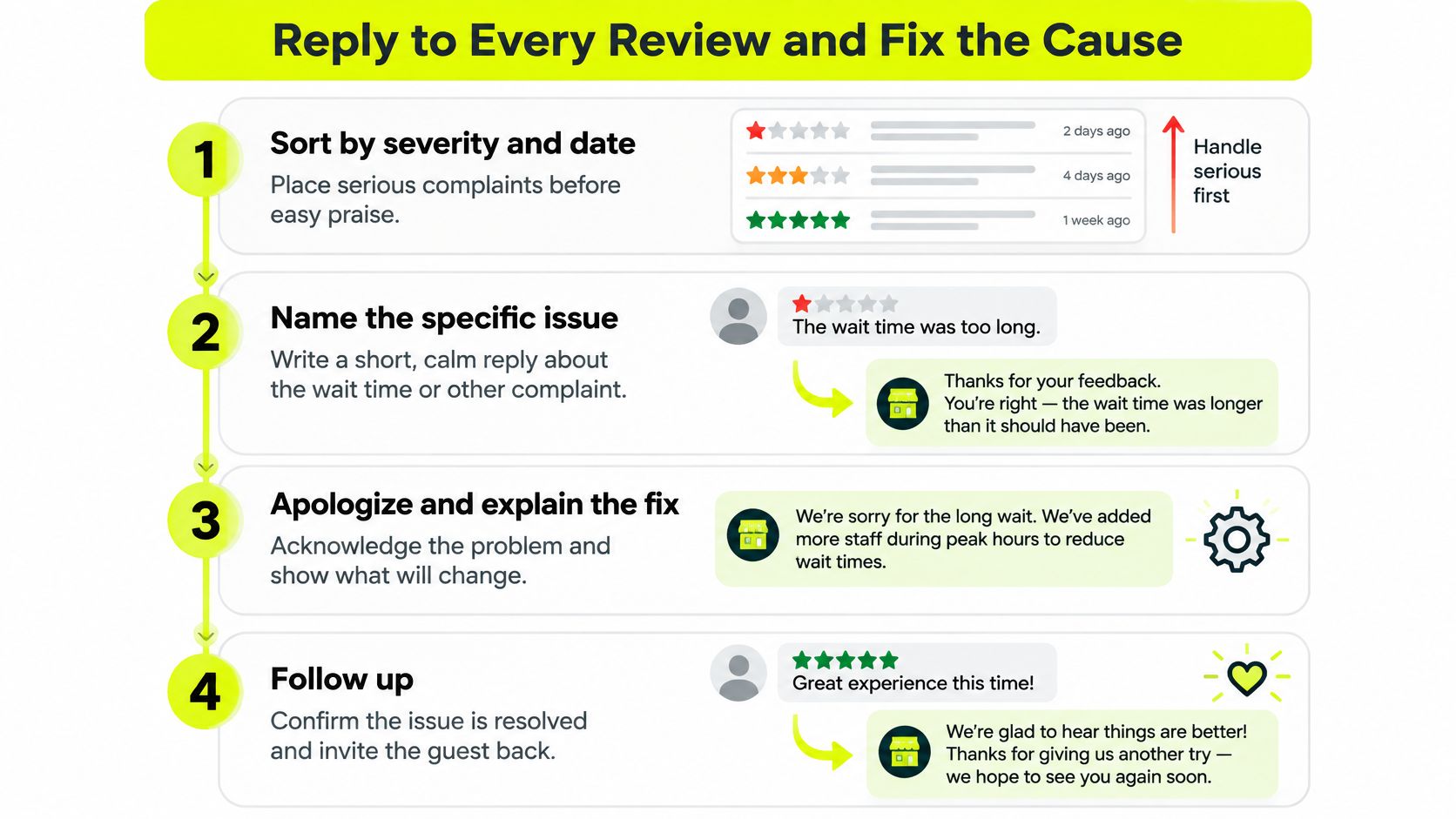
Sort incoming reviews by severity and date. A potential allergen error needs investigation before a routine compliment receives a polished thank-you. Assign coverage for praise as well, but don't let easy replies displace urgent service recovery.
Follow a consistent response process
- Name the issue. A short, calm reply should acknowledge the actual complaint, such as a delayed collection or unclear ingredient information. Generic thanks can make a serious response sound inattentive.
- Clarify factual errors without arguing. Explain the relevant process or finding, but don't publish order records, personal details or assumptions about the guest.
- Provide an offline route. Direct the guest to an existing manager email or business phone line so staff can investigate privately.
- Never request a rating change or removal. The purpose of contact is to resolve the experience, not negotiate the public record.
- Assign the operational fix. Record the cause, responsible owner, due date and completed change in the log.
- Contact the affected guest privately when appropriate. Any refund, replacement or goodwill gesture should depend on service recovery, not a review outcome.
The response and repair cycle should remain connected throughout:
Match the fix to the failure
For a café with counter queues, check where orders stall. If drink collection interrupts ordering, assign a collection position during busy periods and give staff a clear trigger for opening it. A vague instruction to work faster won't resolve competing tasks.
For a bakery with late pickups, compare promised collection times with production readiness. Add a preparation timer and a readiness check before confirming collection. Staff should communicate delays before a guest arrives, rather than apologising only at the counter.
For a restaurant with inconsistent allergen information, reconcile the menu, ingredient records and staff guidance. Use a controlled allergen reference and require staff to escalate uncertainty instead of guessing. A printed card is useful only when someone owns its accuracy.
Inspect subsequent reviews for recurrence and severity, not just a better average. A peer-reviewed hotel-industry study associated beginning to respond with a 0.12-star increase and 12% more reviews, partly because dissatisfied guests became less likely to post short negative reviews. That observational hotel finding isn't a promised result for food businesses, and fewer short complaints don't prove that service improved.
A complaint that stops recurring is more useful evidence than a reply that merely sounds reassuring.
Before closing an issue, the manager should confirm: owner named, cause written, change made, follow-up date set.
Handle Unfair or Policy-Breaking Reviews
A review can feel unfair without qualifying for removal. An owner's disagreement with a guest's interpretation isn't enough to establish a policy violation.
Check the text against Google Maps' prohibited and restricted content rules. Harassment, exposed personal information, spam, conflicts of interest or content about another business may justify a report when the content meets the relevant policy definition.
Separate disagreement from a reportable issue
- Preserve the record: Save the review text, posting details and any relevant operational evidence before reporting.
- Identify the policy reason: Describe the specific violation rather than stating that the review is damaging.
- Record the outcome: Log the report date, reason, platform response and any further action.
A report is a request for platform assessment, not a removal order. Google may accept or decline it, and a manager should avoid promising staff that a disputed review will disappear.
Where the review describes a genuine experience, answer the substance. If a guest misstates a collection policy, the business can explain the policy calmly without accusing the guest of dishonesty. Any correction should be limited to facts that staff can support.
Keep the distinction clear: Reporting prohibited content protects an accurate record. Reporting legitimate criticism merely because it hurts the rating doesn't repair service.
Don't offer compensation for deletion, post fabricated praise or buy reviews to offset criticism. Those tactics introduce another integrity problem while leaving the original complaint unresolved.
Keep expectations realistic
Allow time for guests to experience an operational change and describe it publicly. There isn't a dependable reporting deadline for reputation repair, and the Performance report isn't proof that a particular complaint has been resolved.
Keep reports, public replies and corrective actions in the same log. Some legitimate criticism will remain visible. A credible record shows how the business handled it, not an artificially spotless history.
Track Results With a Weekly Review Routine
The official reporting starting point is straightforward: Google Business Profile's performance guidance directs owners to open the Business area in Google Maps, select Performance, choose a period and view the report.
Use that report alongside the profile's reviews and the internal log. Performance reporting and review records serve different purposes, so managers shouldn't assume every reputation metric appears in the Performance screen.
Weekly metrics to track and where to find them
| Metric | Where to check it | What to compare |
|---|---|---|
| Average star rating | Google Business Profile rating and saved snapshots alongside the Performance report | Current rating against the previous snapshot and baseline |
| New review volume | Profile review dates and the review log alongside the Performance report | Equivalent periods in the previous month |
| Share of negative reviews | The business's own review log | The share in the baseline window |
| Response time | The business's own review log | Elapsed time from posting to a public reply |
| Recurring complaint themes | The business's own review log | Count per category, per week |
Average stars alone can mislead. A steady rating can conceal a growing share of complaints about food safety, missed pickups or staff conduct. Read the review text before treating a stable headline number as reassurance.
Compare equivalent periods and note operational context. A closed day, changed opening hours or a temporary delivery interruption can affect what guests experience. Keep those explanations beside the figures rather than relying on memory during the next meeting.
Repeat a short weekly check
- Open the account records. Select the reporting period and inspect new reviews directly in the profile.
- Compare review activity with the previous period, then record unusual changes.
- Read unresolved complaints. Check whether promised actions were completed and whether the same failure returned.
- Assign the next action and keep the notes in the existing log.
A weekly summary email can reduce repeated manual checking, but it remains a convenience rather than a substitute for Google's account records. Managers should investigate unexpected changes at the original review.
Measurement also shouldn't become a ranking promise. The guide to better ranking on Google provides related context, but neither a reporting routine nor a review collection tool guarantees search positions or recommendations.
Set a short appointment on the same weekday and protect it like a stock check. Consistent attention is more useful than an occasional lengthy meeting after a complaint escalates.
Keep Business Details Consistent Across Platforms
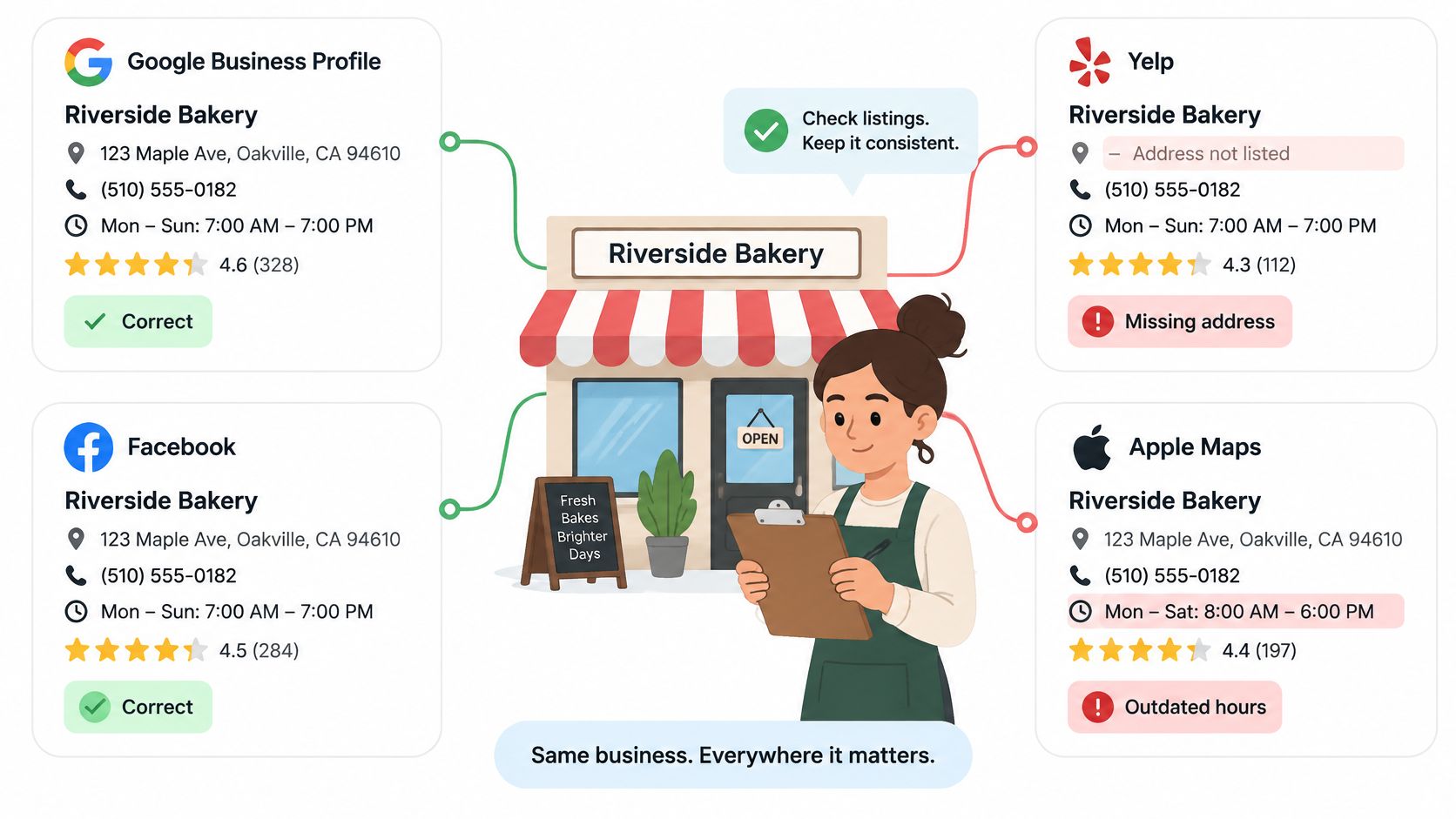
A bakery can have excellent reviews and still disappoint a guest who arrives after closing because a directory shows old hours. The problem isn't the star rating. It's an incorrect fact that the business needs to correct where it appears.
Discovery extends across search, directories, delivery services, booking platforms and AI-generated summaries. SOCi's local SEO statistics overview describes the growing role of generative-AI local recommendations, reinforcing the need to manage accurate information beyond a single review profile.
A listing audit should cover the information guests use to decide whether and how to visit.
Business details to verify on each platform
| Detail | Check on | Fix by |
|---|---|---|
| Business name | Google, directories, delivery apps, booking platforms, social profiles | Match the registered name exactly where required; use the accurate customer-facing name under each platform's rules |
| Address and phone number | Every listed platform | Correct the platform where the detail is stored |
| Opening hours | Google and every delivery or booking app | Update hours at the source and note the date in the log |
| Menu or service details | Delivery apps, booking platforms, social profiles | Replace outdated items and allergen notes |
| Policies | Booking and delivery platforms | Align cancellation and pickup rules with current policy |
Distinguish an experience complaint from a data error. A guest reporting an unhelpful response describes an experience requiring investigation. A platform showing an obsolete menu contains a factual error requiring a source update. Sometimes both need attention.
Prioritise mistakes that prevent a visit or create a safety concern. Wrong location details, misleading hours and outdated allergen information deserve attention before cosmetic wording differences.
Correct the original record
Update each platform where the information lives, then log the submission date and check the public result. The local business listing guide can help organise that platform inventory.
An AI answer isn't necessarily a directly editable business listing. When it misdescribes a venue, inspect any cited sources, correct factual errors there and document the inaccurate answer. No business can guarantee when or how an AI system will change its summary.
Start with these platform checks:
- Google: Location, hours and contact details.
- Apple Maps: Pin, address and opening information.
- Facebook: Business details and current menu.
- Yelp: Listing accuracy and customer-facing policies.
- Main ordering or booking platform: Availability, pickup rules and menu information.
Choose Your First Fix This Week
The best starting action is the recurring problem with the clearest evidence and a manageable operational fix. A bakery with repeated late collections needs a readiness process before it needs a larger review campaign.
Choose one service stage, name the responsible manager and write down how completion will be checked. Keep the scope narrow enough that staff can explain the change during a shift handover. Adding several initiatives at once makes it harder to establish which change helped.
Decide whether the immediate need is repair or collection
- Repeated service failure: Change the process and check subsequent guest experiences.
- Unanswered feedback: Establish ownership and apply the response procedure.
- Sparse feedback: Introduce a consistent request routine without selecting guests by satisfaction.
- Incorrect listings: Correct the source information before attracting more visits.
review² is one option for QR-led guest feedback. A guest scans a sticker, leaves a Google review and claims a reward; review² checks that the review has appeared before the reward is ready, so clicking through to Google isn't enough. Staff redeem a live, single-use coupon on the guest's phone rather than accepting static screenshots, and the reward is available regardless of rating or opinion. Optional consent-based name and email collection supports guest contacts, while weekly email reports show new reviews, star ratings and progress.
Evaluate the workflow without assuming an outcome
The sample QR pages demonstrate a possible guest experience. They don't publish or verify a Google review, issue a redeemable reward or enrol a guest in a mailing list.
A functioning verification and coupon process doesn't remove platform-policy risk. Google may still remove incentivized reviews or restrict a listing, and results vary by business. No tool can guarantee reviews, ratings, rankings or AI recommendations.
The immediate task remains concrete: select the most frequent substantiated complaint, assign its fix and enter the completion date in the log. Collection software should support an accountable operation, not distract from repairing it.
review² offers QR-led guest feedback, review verification, single-use reward coupons and weekly reporting for local businesses, with the platform-policy limitations described above. Owners considering that workflow can explore the demo or learn more at review², then choose one documented service fix to start this week.